Consumer chat sites
A seat, then a black box
- High cost, weak spend control and audit
- Locked to that vendor’s models
- A few power users; everyone else uses random apps
- Background automations can burn tokens unnoticed
- Staff are expected to prompt well
One central install for the whole company: chat, named agents, scheduled jobs, and an admin desk. Hard caps like $1/day. A ledger for every request — so finance can see where the money went.
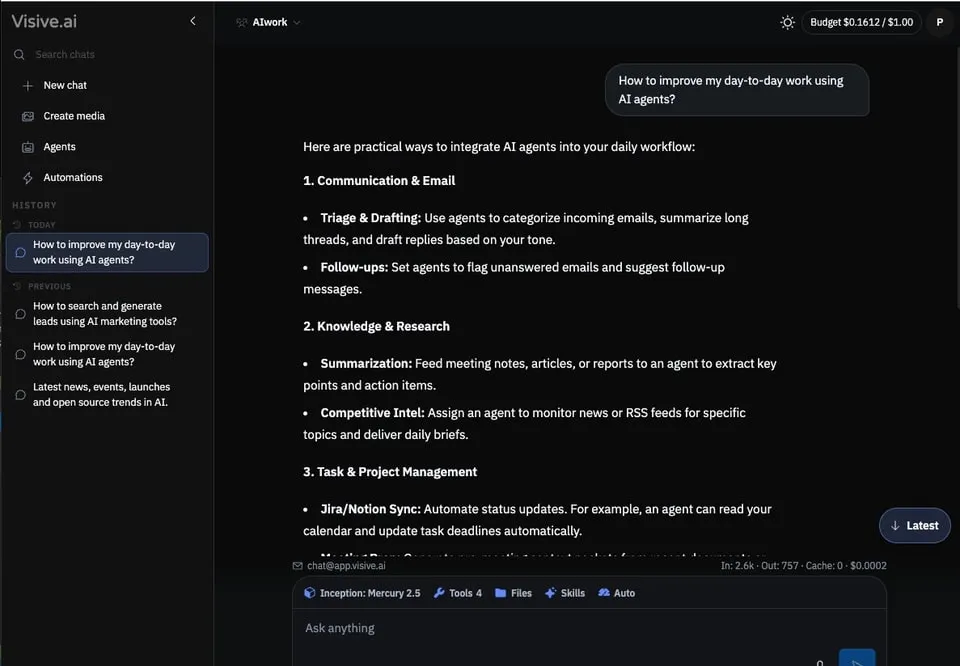
Hard budgets, named agents with email, models you choose, and spend you can explain — in under two and a half minutes.
Set a hard cap — $1/day, $3/week, $10/month, or whatever finance agrees. The header always shows spend versus the cap. Admin reports show which threads and which processes used it — not a vague “credits left” tile.
Monthly by surface


| Where the money went | In | Out | Cache | Cost |
|---|---|---|---|---|
| One chat turn | 2.6k | 757 | 0 | $0.0002 |
| Nova heartbeat thread | 1,468k | 33.9k | 544k | $0.1610 |
One stack for chat, agents, and email — on web and mobile — with budgets and an audit trail built in.
Consumer chat sites
Visive Agent
Your company connects an OpenRouter account. From there: OpenAI, Anthropic, Google, xAI, and thousands of open-source models at competitive prices. Visive and OpenRouter can both hold the fence — allowed models, prompt policies, org budget plus per-user distribution.


Name, photo, mailbox, heartbeat, SKILL.md, knowledge files. Identity is the agent’s email — not the person who is logged in. Managers create the agent and share the address. Staff just email a question.
Nova
agent-nova@app.visive.ai


Set 3, 6 or 12 hours. On each wake the agent reads pending work, skills, reminders and the knowledge base. If something needs a person, it emails the owner. If not, it logs the idle note and sleeps.
Upload a SKILL.md, or pull public skills from GitHub. Attach files as the agent’s knowledge. Reminders and web research sit on the same agent — the staff member never sees the prompt.

Pick a job, set a clock, get the result in email — news digests, competitor briefs, inbox alerts. One schedule is enough to start; add more as the team needs them. Prefer cheaper open-source models so cron work does not burn frontier spend.

Keep private threads in My workspace. Put shared chats, agents and automations in a team workspace so the work is visible — not trapped in one person’s ChatGPT history.

Turn tools on or off. Load skills from GitHub or a file. Connect Gmail, Google, Microsoft, Zoho and the rest of a 1,000+ connector catalog. Model allowlists and usage live here too.


If you already pay for consumer chat and cannot explain the bill — or half the company is on random mobile apps — this is the install.
One default for the company. Named agents for work that repeats.
Allowlists, tool toggles, connectors, workspaces, user accounts.
Hard caps per seat. In / out / cache on every request and thread.
Create the agent, share its email. Staff do not need prompt training.
Budgets, agents, OpenRouter, and how we start — answered plainly.
Those are model subscriptions. Visive Agent is a company desk: accounts, hard per-user budgets, named agents with email, connectors, and a token-level audit trail. Keep personal seats if you want — put the company default here with a cap.
Yes. OpenRouter holds the model catalog and org budget. Visive distributes that budget per user, allowlists models, and logs every request. Guardrails can sit on both sides.
Set caps such as $1/day, $3/week, or $10/month per user. The header always shows spend versus the cap. Admins see which threads and surfaces used it — Chat, Agents, or Automations — not a vague credits tile.
A virtual employee: name, avatar, mailbox (for example agent-nova@app.visive.ai), heartbeat, skills, and knowledge files. Managers create it and share the address. Staff email a question — they do not need to prompt.
Use frontier models where quality matters. Put scheduled jobs and heartbeat work on cheaper open-source models. The admin decides the allowlist.
We do not claim vendor training policy here. What you get is a company install with admin control, model choice via OpenRouter, and spend visibility on every request.
Yes — watch the 2-minute overview on this page for hard budgets, named agents with email, models, and automations.
Book a demo or send an inquiry. We map seats, OpenRouter, and the first named agent — usually a mailbox the floor can already email.
We’ll map seats, OpenRouter, and the first named agent — usually a mailbox the floor can already email.